
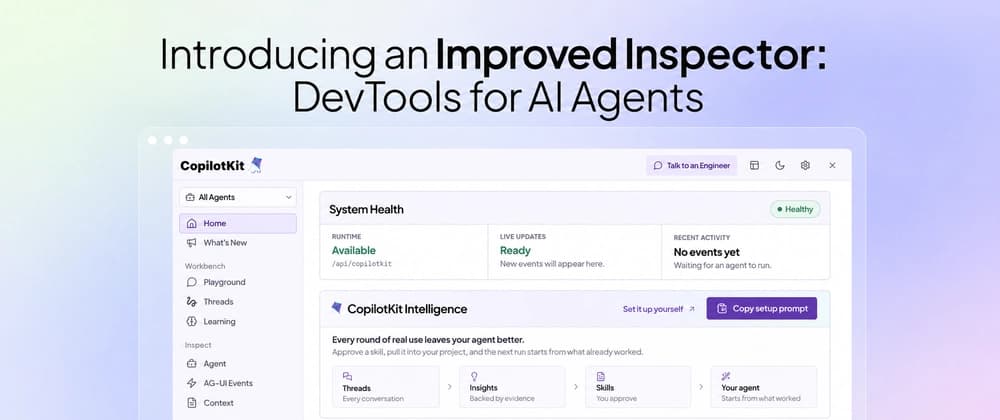
Agents broke the debugging model we've relied on for decades. They stream tokens, call tools mid-response, delegate to subagents, are long-running by design and so on. The whole thing is a black box.
The Inspector changes this. It runs inside your app and shows every event between your agent and your frontend as it happens, with the failure linked to the event behind it and an isolated Playground to fork any saved conversation and try a different path.
Everything flows through AG-UI (Agent-User Interaction Protocol), the standard protocol connecting agents to user-facing apps.
The inspector now also has a direct connection to CopilotKit Intelligence, which powers Threads, analytics, and enables self-learning for agents from the insights gained from agent-user interactions. Each Insight becomes a SKILL.md you review, edit, and ship with your project.
It's on by default in every development build, so there's nothing to install. Works across React, Vue, and Angular.
The Inspector never loads in production or during server rendering, and setting the flag to true doesn't change that.
With CopilotKit Intelligence connected, your agent extracts insights from real conversations and starts improving on its own.
Learning reads the runs behind your saved threads, finds patterns across them, and writes each one out as a SKILL.md you approve before it ships. It stores it in Learning containers, which control the scope (single user, a team, or the whole org).
Let's say your agent keeps getting asked to schedule meetings, and across those conversations people keep steering it the same way: look at both calendars, come back with a few options, don't book anything without asking. Learning reads those runs, finds the pattern, and writes meeting-scheduling/SKILL.md. Now the next run uses that skill.
That's just one example. With more agent-user interactions, more patterns get found and your agent keeps getting better.
If you want to dig deeper, Atai wrote about why self-improvement is the moat and how the learning loop works underneath.
Testing an agent usually means talking to it through your own app and filling your chat history with junk.
The Playground is an isolated tab that runs on your app's actual runtime, with any agent you have connected. Spin up as many threads as you want, find errors, try the weird edge cases. None of it reaches your app's chat or its saved conversations.
Playground threads disappear when your local session ends, unless Intelligence is connected to keep them.
You can now take any stored conversation, fork it into the Playground, and pick up where it stopped.
This is the fastest way to reproduce a bug a user hit. Find their thread, try a different path, and their data stays exactly as it was.
Every conversation the Inspector has stored shows up in the Threads pane. Click View in your app on any of them, and it loads into your app's chat, so you see it the way your user saw it. The thread gets tagged IN APP while it's active, and Stop viewing puts you back.
It works the other way too. Any assistant message in your app has a View in Inspector action that opens the matching thread and jumps to that message. That button only shows up in local development.