
Disco Doodle is my hobby site — free, no-signup drawing prompt generators, a division of my little umbrella brand Plaid Labs. Daily Doodle was the original: pick a few categories (animal, occupation, prop, style...), hit spin, get a silly little drawing idea. Sometimes you just need to get past that blank page. More on that here.
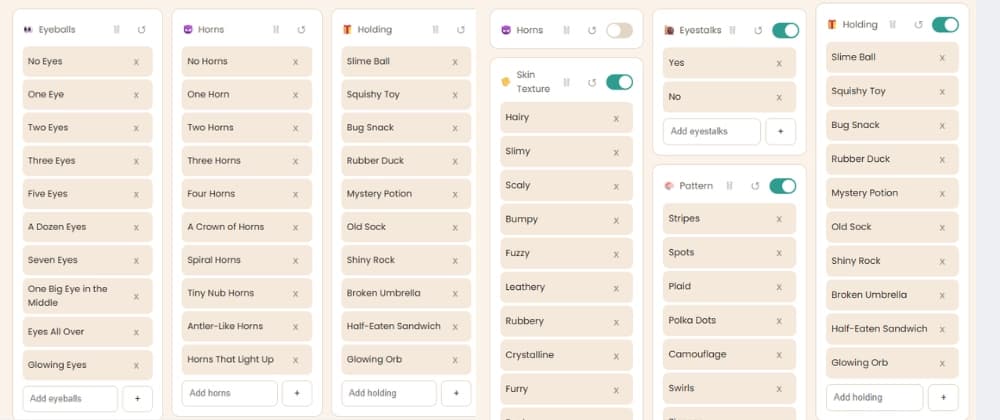
A while back I asked Claude to build a second generator, Monster Maker, as a straight-up fork of Daily Doodle's engine but with monster-flavored categories: eyeballs, horns, skin texture, arm style, eyestalks, patterns, a "silly / scary / sleepy" vibe dial. Same beginner/advanced modes, same spin animation, same everything under the hood — just a new skin and a new set of categories.
That part went fast. What I actually want to write about is everything that happened after "it works" — the design back-and-forth, a Firebase security rules rabbit hole, building a share feature that doesn't feel like an ad, and then talking an AI agent into recording its own tutorial video of the thing it just built.
Monsters are different than drawing animals or people. I relate to drawing them because they can't look, "wrong". No one can say your proportions are off, or you forgot to add a nose, or hey that arm is longer than the other...because it's a monster. They only enter our world at nighttime while we're sleeping. Via a network of magical doors... oh wait.
Small but real gotcha worth mentioning: I was working in a fresh Cowork session, and it had no memory of Daily Doodle's code — it lives on my machine / in the repo, not in the AI's head. So the very first thing that happened wasn't code, it was a clarifying question: do you have the file, can I reach your computer, or should I build from scratch?
I pasted the whole daily-doodle.html file in. From there the fork was genuinely mechanical — same CSS custom properties, same category-card component, same slot-machine spin animation, just new data:
The sentence builder was the one piece that actually needed new logic, since "Your monster has Two Eyes and Four Horns, with Hairy skin, wiggly eyestalks..." doesn't follow the same grammar as Daily Doodle's "a [style] drawing of a [job] [animal] wearing [outfit]." Small thing, but it's the difference between a reskin and something that reads like it was actually written for monsters.
This is the part I'll happily admit: I could not settle on a background, and the AI just... kept building whatever I said next. Light blue polka dots. Then "big scalloped scales, olive green and khaki" (which, credit where due, it built as actual CSS radial-gradient math and got right on basically the first try — no image assets, just gradients tiled in an offset grid). Then "actually just olive green with giant polka dots." Then "remove the polka dots." We landed on flat olive green.
I really just didn't want it to look ugly, but wanted it to be fun when you changed from Daily Doodle to Monster Maker. A few of the tries were exactly what I asked for, and what I asked for was wrong and hideous!
The one genuinely useful thing that came out of that back-and-forth: once the background got dark, the plain gray subtitle/instruction text became almost unreadable against it. Rather than just darkening the text globally, the fix was giving those bits of text the same rounded "pill" treatment the app already used for buttons and badges — so it reads as an intentional design choice instead of a patch:
Small detail, but it's the kind of thing that's easy to miss when you're iterating fast — worth actually looking at your own contrast, not just trusting that "it compiles."
Both generators share one Firebase Realtime Database for their visitor counters — /counters/dailyDoodle and /counters/monsterMaker, two independent keys in the same JSON tree. That part's simple. What wasn't obvious to me was why the counter worked for one and not the other, and whether I needed a whole second Firebase project.
I ended up screenshotting my actual Firebase console rules tab a couple of times and just asking "does this help?" The short version of what I learned: Realtime Database rules can be scoped to a specific path or left wide open at the root, and my original rules were the default test-mode rules — open, but with a hard expiry date baked in ("now "). That's the kind of thing that quietly breaks a hobby project months later with zero warning. We replaced it with a permanent rule scoped just to /counters:
Open where it needs to be, closed everywhere else, no expiry ticking down in the background.
The ask was: after you spin, let people save an image — the result sentence, a counter badge, something you'd actually want to post next to a photo of your drawing — without it screaming "please post my app." That "not overly promotional" constraint mattered more than it sounds like it should.
The whole thing is a element, never attached to the page, rendered on demand and downloaded as a PNG:
That "measure first, then size the canvas" step mattered a lot in practice — a short beginner-mode sentence and a long seven-category advanced-mode sentence are wildly different lengths, and a fixed-size card either wastes half the image on empty space or clips the text. Sizing the canvas to the content fixed both at once.
The watermark is one small line of text in a corner, not a banner. That was the actual design decision — the whole point is that someone wants to post this next to their own art, and a self-promotional overlay works against that.