
Someone on a Zoom call said a URL yesterday. I was still writing down the previous bullet point. By the time I looked up, they had moved on. I muted myself, typed "sorry, can you repeat the link?" into chat, and waited.
I didn't need them to repeat it. I needed the last thirty seconds of audio sitting in memory, ready to replay. Not a screen recording I forgot to start. Not Otter in the cloud. Not scrubbing back through a two-hour lecture file.
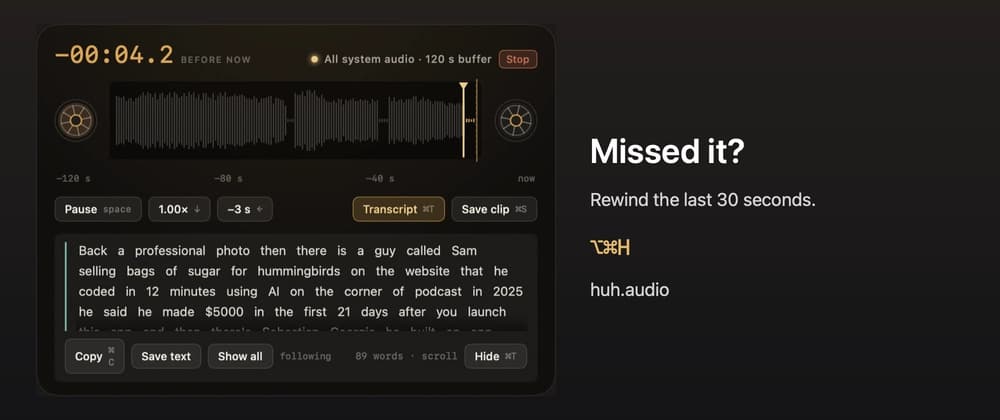
So I built Huh?, a macOS menu bar app that holds the last 30 seconds to 2 minutes of whatever you're listening to in RAM, and replays it when you press ⌥⌘H.
I posted a short clip on X first. A few people asked if they'd pay $5 for it. This post is the longer answer: what it does, what broke while I was building it, and the parts I'm still working on before I'd call it properly shipped.
That's the tweet that started it. Built a Mac app because I kept saying "wait, what did you just say?" in meetings, calls, podcasts, everything.
Huh? lives in your menu bar. It arms a rolling audio buffer, either system audio from one app, everything, or the microphone. You keep listening. When you miss something, you press ⌥⌘H. The last N seconds replay instantly. You can slow down to 0.75x or 0.5x without changing pitch. You can read an on-device transcript if what you missed was a name or a URL, not just the sound of it.
Nothing is written to disk unless you explicitly save a clip with ⌘S. Nothing is uploaded anywhere. The only network request the app can make is downloading a Whisper model, and only if you press Download in Settings.
That's the whole product loop. Everything else is engineering to make that loop feel instant and not creepy.
Before I wrote a line of Swift, I tried to talk myself out of building this. Here's what I actually considered.
Screen recording is a commitment. You start it before the moment. It writes to disk. It feels heavy for "I missed one sentence."
Huh? is retroactive by default. The buffer is already there. You're not deciding to record, you're deciding to replay.
I didn't want to upload meeting audio. I didn't want another account. I didn't want a bot in my call. I wanted a hotkey that works when I'm alone watching a lecture at 1am.
Constraint became: on-device only. Transcription included, but nothing leaves the Mac unless I export a clip.
YouTube has a rewind button. Zoom does not. Podcast apps do, badly. A menu bar utility follows you across apps. That's the point.
Pick what to listen to. One app (Chrome, Zoom, whatever), everything playing through the system, or the mic. The buffer sizes to your setting, 30 seconds up to 2 minutes.
Replay with one hotkey. ⌥⌘H opens the HUD and starts playback from the end of the buffer, the moment you just missed. No file picker. No "where did I save that recording."
Slow it down without demons. 0.75x and 0.5x run through AVAudioUnitTimePitch so pitch stays natural. Useful when someone reads a URL at conference speed.
Read what you missed. Two on-device engines: Apple's SFSpeechRecognizer (no setup) or Whisper via WhisperKit (one-time model download, better on names and URLs). Click a word to seek. The transcript scrolls and highlights the active word during replay.