
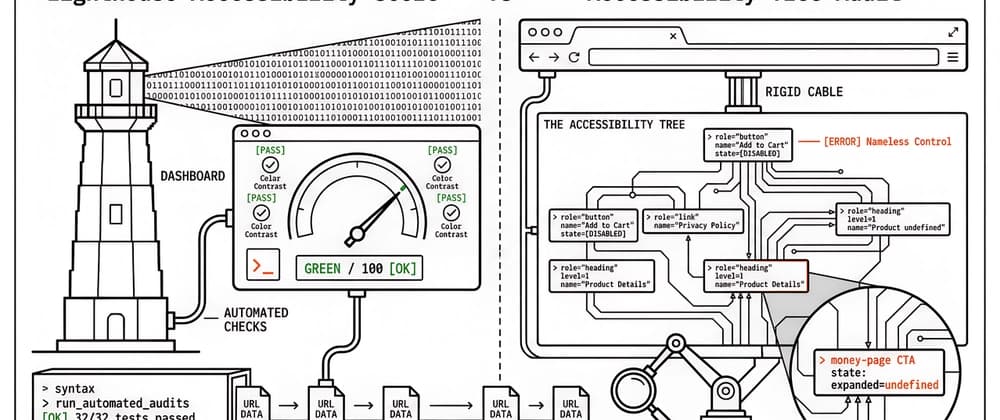
The accessibility tree is the structured layer the browser builds from the DOM: roles, names, and states that assistive technology has used for decades. Screen readers walk it. Playwright can snapshot it. Agentic browsing tools that refuse to read pixels lean on it as well. That is a different artefact from the Lighthouse Accessibility category score, which answers whether a fixed set of automated checks passed on one lab run. Teams that treat a green score as proof that AI agents or assistive technology can complete a purchase path are mixing two jobs.
John McAlpin’s August 2026 Search Engine Land piece on SEO use cases for auditing the accessibility tree pushed the tree into SEO conversations because agents now consume the same layer. That framing is useful for account teams who already hear “AI search” in every pitch deck, but a feature rundown is not an ops playbook. Agency work still needs a shorter cut: what the tree is, why the Lighthouse score is not a substitute, and which audits belong on money pages and in continuous integration.
Browsers compute an accessibility tree from markup, styles that affect visibility, and ARIA. Each node that matters usually carries a role (button, link, heading, textbox), an accessible name (the label a stranger would hear or read), and state (expanded, disabled, checked). Chrome DevTools can show the full-page tree beside the DOM. Playwright’s ARIA snapshots export a YAML view of the same structure for tests.
Chrome DevTools Accessibility tab with “Show accessibility tree” on: roles and names replace the DOM view so you can see what assistive technology (and many agents) actually receive. Source: Chrome for Developers accessibility reference (captured 12 Sep 2026).
Sighted users often infer structure from size and whitespace. Machines do not. A pricing call to action built as a clickable div with no name may look perfect in a design review and still be absent or anonymous in the tree. That gap is what SEO and agent-readiness briefs are naming in 2026, and it is the same gap accessibility specialists have been filing for years.
| Question | Lighthouse Accessibility category | Accessibility tree audit | |----------|-----------------------------------|---------------------------| | What does it answer? | Did a fixed set of automated checks pass on this lab load? | Can a reader of roles, names, and states complete the jobs on this URL? | | Typical output | Weighted 0–100 score plus failed audits | Pass/fail on CTAs, forms, landmarks, headings, image names | | Strength | Fast regression signal in CI and PageSpeed Insights | Catches unnamed controls and visual-only structure the score can miss | | Limit | Not a full WCAG audit; green is not “accessible” | Point-in-time unless you snapshot in CI |
Chrome documents how the Lighthouse accessibility score is weighted, and that documentation is the authoritative entity for the score itself. Our operational point is narrower: keep running the score, and still open the tree on revenue URLs. A page can pass colour-contrast and label audits while the primary checkout button remains a nameless control, or while product copy that sells the offer only appears after client-side hydration that some agents never finish.
PageSpeed Insights desktop lab for apogeewatcher.com (12 Sep 2026): Accessibility 92 is a useful regression signal, not proof that every money-page control has a clear role and name in the tree. Agentic Browsing sits beside it as a separate lane.
Accessibility work that also improves Core Web Vitals (keyboard latency, layout-stable focus) is a separate prioritisation problem. We cover that crosswalk in Accessibility + Core Web Vitals. The tree audit below is about machine-legible structure, not whether Interaction to Next Paint moved on a dashboard.
A workable seed set is usually ten to twenty URLs ranked by revenue or conversions, not by homepage vanity. Homepage-only samples miss the templates where unnamed calls to action actually sit. For each URL, the useful capture is the tree itself (DevTools full-page view, or a headless export), then a short pass/fail score against: Primary call to action exposed as a button or link with a descriptive accessible name. Every form control has a programmatically associated label. Navigation sits in a navigation landmark; main content sits in a main landmark. Pricing, product details, and contact facts appear as readable text nodes, not only in images or canvas. Interactive state that users see (open accordion, enabled submit) updates in the tree (aria-expanded, disabled, and similar).
What good looks like: a stranger reading only roles and names could name the page’s jobs and complete them without guessing. Failures usually trace to div click handlers, icon-only buttons without names, or inputs missing labels. Native HTML covers most controls; ARIA fits when native elements cannot express the widget.
McAlpin frames this as an agent readiness audit. The same bar applies to assistive technology. If the tree lies about state, a screen reader user is misled with the same confidence an agent would be.
Traditional rendering checks ask whether content appeared in the HTML or after hydration. The accessibility tree asks a sharper question: did substance reach the layer agents and assistive technology read, and when? Capture the tree before and after client-side JavaScript where your tooling allows a diff. Core headings, primary links, and product grids that exist only in the post-hydration tree are invisible to any consumer that does not fully execute your scripts. That pattern is familiar from crawler audits; the accessibility tree simply makes the missing nodes explicit. When the tree before hydration is empty of the jobs you sell, server-render or pre-render those money templates so substance is present before scripts finish.
Crawler exports report what sits in the HTML source. The accessibility tree reports what is consumed after roles and names resolve. Those views disagree more often than teams expect: visual headings that are styled divs, aria-label overrides that replace good anchor text with “Link”, and landmark-free pages where every block floats as generic content.
For content templates, heading nodes pulled from the tree are the practical sequence check (one clear document title, no decorative skips). Meaningful blocks belong inside landmarks. For internal links, sorting link-role nodes by accessible name usually surfaces empty names first, then generic “Read more” clusters, then overrides that discard useful visible text. Semantic heading hierarchy as a design argument is covered separately in our Hashnode piece on heading hierarchy and semantic HTML. Here the job is narrower: whether the tree matches the outline you intended to publish.
Point-in-time audits go stale on the next component refactor. Playwright’s toMatchAriaSnapshot (see the ARIA snapshots documentation) commits a YAML baseline of a template’s tree and fails the build when a deploy strips a name, removes a landmark, or demotes a heading. Reviewers read a human-scale diff: a button that used to say “Complete purchase” and now says nothing.
Playwright’s ARIA snapshot assertion: a YAML view of roles and names you can commit and diff in CI, so the accessibility tree cannot regress silently on the next redesign (docs captured 12 Sep 2026).
That check earns its keep on homepage, product, and checkout templates (or your equivalents). Snapshot updates belong with intentional redesigns; unexpected diffs work best as release blockers the same way broken redirects already do. That is how accessibility tree SEO work survives sprint pressure instead of living only in a quarterly PDF.